

Tersa EDA
Tersa EDARF / analog

Circuitos analógicos e RF, ajustados em qualquer lugar.

Tersa EDA é um app mobile e desktop para criar esquemáticos, rodar simulações, ajustar componentes e inspecionar medições RF.

EsquemáticosAC / transienteParâmetros SCarta de SmithTuner de componentes
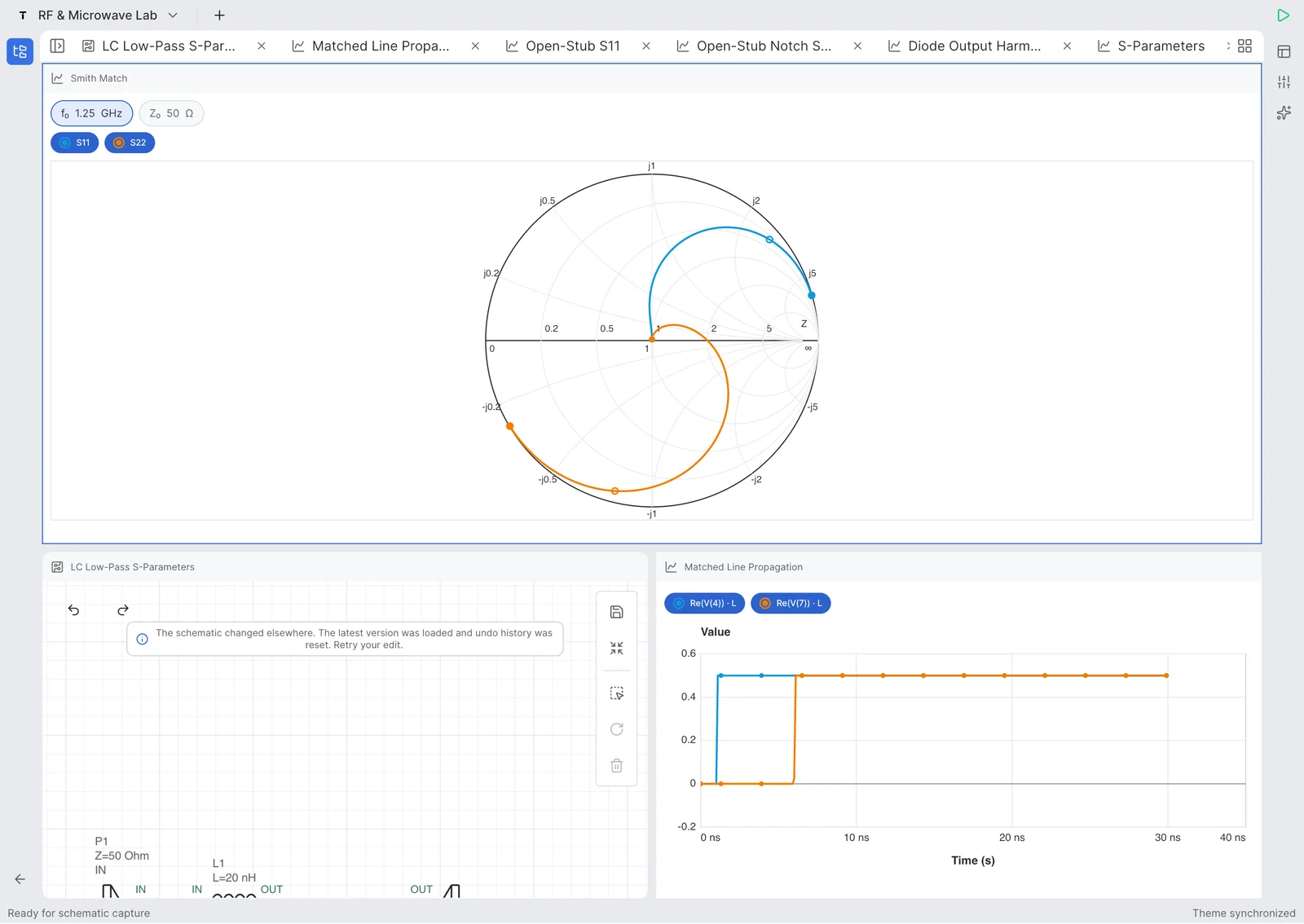
RF e carta de Smith
Editor esquemático
Tuner de componentes
Executar / Live

Prova do produto

Projetado para trabalho real com circuitos.

Monte um esquemático, escolha uma análise, adicione medições e ajuste valores sem sair do dispositivo.

Editor esquemático
Editor esquemático

Editor esquemático

Desenhe circuitos analógicos e RF com portas, componentes, net labels e edição touch-friendly.

Medições
Medições e gráficos

Medições e gráficos

Inspecione traces, marcadores, resposta em frequência e medições derivadas.

RF
RF e carta de Smith

RF e carta de Smith

Analise parâmetros S, return loss, insertion loss, impedância e trajetórias na carta de Smith.

Updated July 27, 2026

Tersa EDA answers

What is Tersa EDA?

Tersa EDA is an RF and analog circuit simulation workspace for engineers, students, and hardware teams who need a focused schematic-to-measurement flow. It combines schematic capture, SPICE-compatible analysis setup, plots, RF measurements, Smith chart inspection, and component tuning in one product surface. The goal is not to replace large desktop EDA suites. The product is designed for quick experiments, tablet review, mobile debugging, and focused circuit tuning when the important question is how the response changes after a component value, port, or measurement is adjusted.

What RF measurements does it support?

Tersa EDA presents RF results around practical measurements: S11, S21, S12, S22, return loss, insertion loss, gain, stability-oriented traces, frequency markers, and Smith chart trajectories. The workflow starts from the schematic, adds ports and analysis settings, then keeps the plot and tuner connected to the circuit. This makes it useful for filters, matching networks, resonators, small-signal experiments, and quick RF review where the designer needs to compare traces instead of exporting data between separate tools.

What does the 500 MHz LPF example show?

The 500 MHz low-pass filter example demonstrates a complete RF workflow on iPad. It shows a 50 ohm ladder filter with series inductors, shunt capacitors, input and output ports, S-parameter simulation to 1 GHz, insertion loss, return loss, and component tuning. The blue S21 trace shows passband behavior and roll-off, while the green S11 and S22 traces help inspect matching. The tuning sweep makes cutoff movement visible as capacitor and inductor values change around the target frequency.

Recursos

Do esquemático à medição.

Editor esquemático touch-friendly

Crie circuitos com componentes, portas, labels e folhas reutilizáveis no celular, tablet ou desktop.

Resultados de simulação

Rode análises AC, transientes e RF com gráficos limpos, marcadores e controles de traces.

Ferramentas RF

Inspecione parâmetros S, return loss, insertion loss, cartas de Smith, ganho e métricas de estabilidade.

Tuner de componentes

Ajuste valores de componentes e veja imediatamente como a resposta do circuito muda.

Fluxo de trabalho

Do esquemático ao insight.

Monte um esquemático, escolha uma análise, adicione medições e ajuste valores sem sair do dispositivo.

01

Desenhe o circuito

Posicione componentes, conecte nets e defina portas.

02

Escolha a análise

Rode simulações AC, transientes ou RF.

03

Adicione medições

Plote tensões, parâmetros S, perdas e marcadores.

04

Ajuste valores

Altere componentes e compare a resposta.

Product demos

Veja workflows RLC reais no iPhone e iPad.

Vídeos curtos mostram criação de esquemas, simulação, medição e ajuste ao vivo de componentes no Tersa EDA.

Abrir no YouTube
iPhone shorts

Real-Time RLC Circuit Tuning on iPhone

Tune an RLC circuit directly on iPhone and watch the response update while component values change.

Abrir no YouTube
iPhone shorts

Building and Simulating an RLC Circuit on iPhone

Create an RLC schematic on iPhone, run simulation, and inspect the first measurement workflow.

Abrir no YouTube
iPad walkthroughs

Tuning RLC Resonance in Real Time on iPad

Use the iPad workspace to tune resonance and compare circuit response changes on a larger engineering canvas.

Abrir no YouTube
iPad walkthroughs

Building an RLC Resonator on iPad | Tersa EDA

Build an RLC resonator from scratch on iPad and move from schematic capture into analysis setup.

Abrir no YouTube

RF example

500 MHz low-pass filter example on iPad.

A concrete LPF case study built in Tersa EDA: schematic capture, 50 ohm ports, S-parameter simulation, insertion loss, return loss, and component tuning around a 500 MHz target.

Target

500 MHz LPF

Ports

50 ohm IN / OUT

Analysis

S-parameters to 1 GHz

Workflow

Schematic, plot, tuner

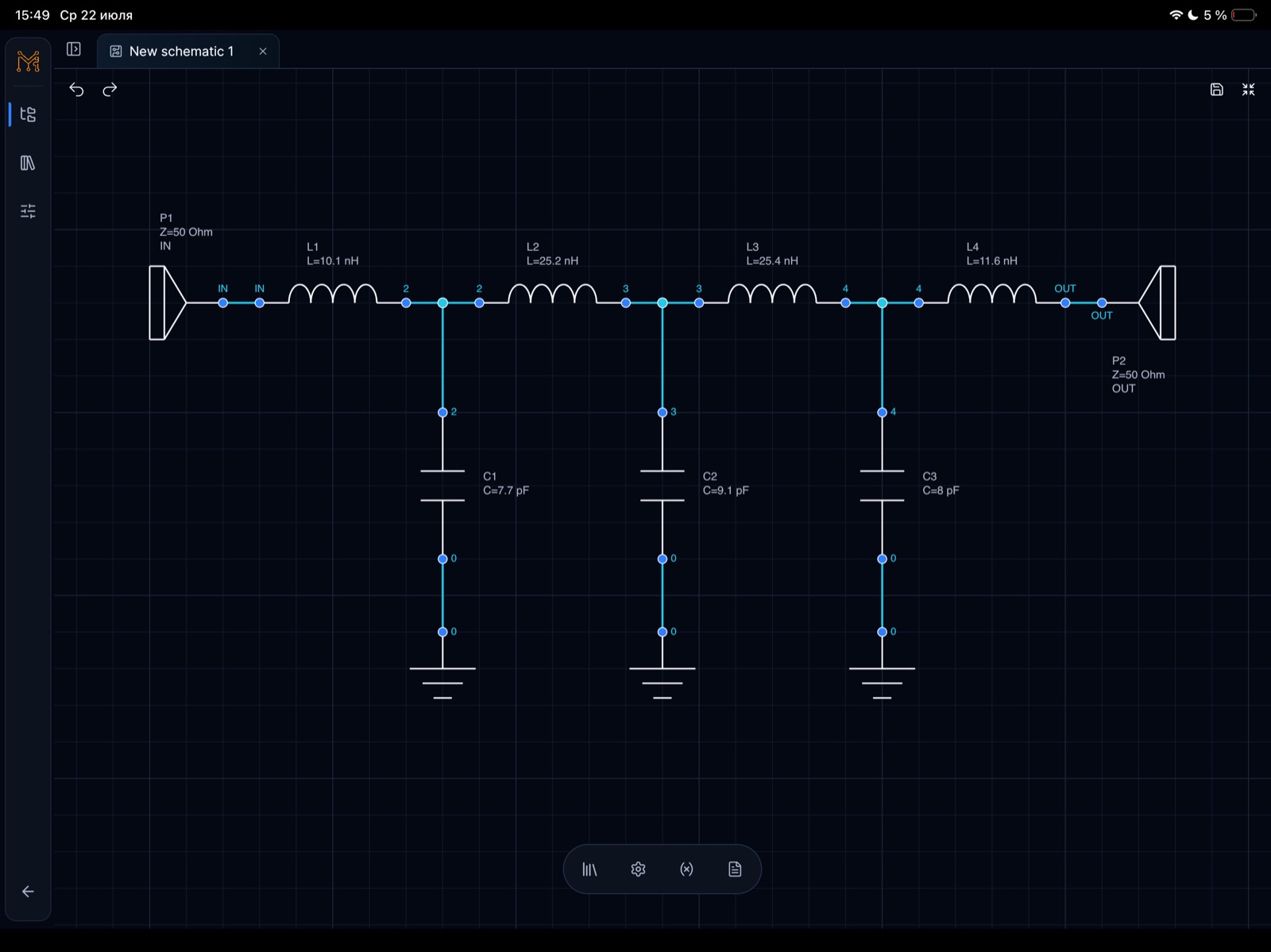
This example shows a lumped 500 MHz low-pass filter workflow, not a generic screenshot gallery. The circuit uses a ladder topology with 50 ohm input and output ports, series inductors, shunt capacitors, and RF measurements plotted from DC to 1 GHz.

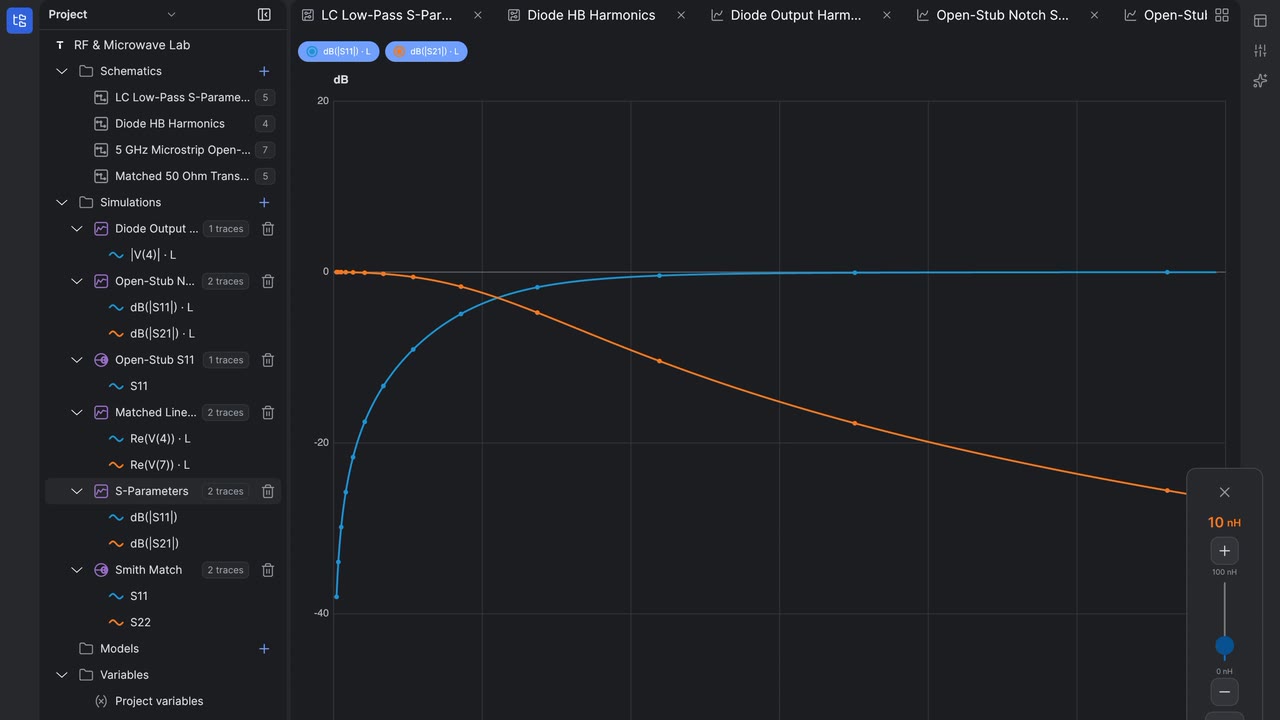
The blue S21 trace shows the passband and roll-off, while the green S11/S22 traces help inspect matching and return loss. Tuning sweeps make cutoff movement visible as component values change.

500 MHz low-pass filter schematic with 50 ohm input and output ports, four inductors, and three shunt capacitors in Tersa EDA on iPad
500 MHz low-pass filter schematic on iPad. Schematic capture for a 50 ohm 500 MHz low-pass filter with L1-L4 series inductors and C1-C3 shunt capacitors.
S-parameter plot for a 500 MHz low-pass filter showing S21 passband and roll-off toward 1 GHz in Tersa EDA

500 MHz LPF S-parameter response

S-parameter response with S21 staying flat through the passband before the transition region toward 1 GHz.

Tunable parameter panel for a 500 MHz low-pass filter showing capacitor and inductor optimization ranges on iPad

500 MHz LPF tunable component parameters

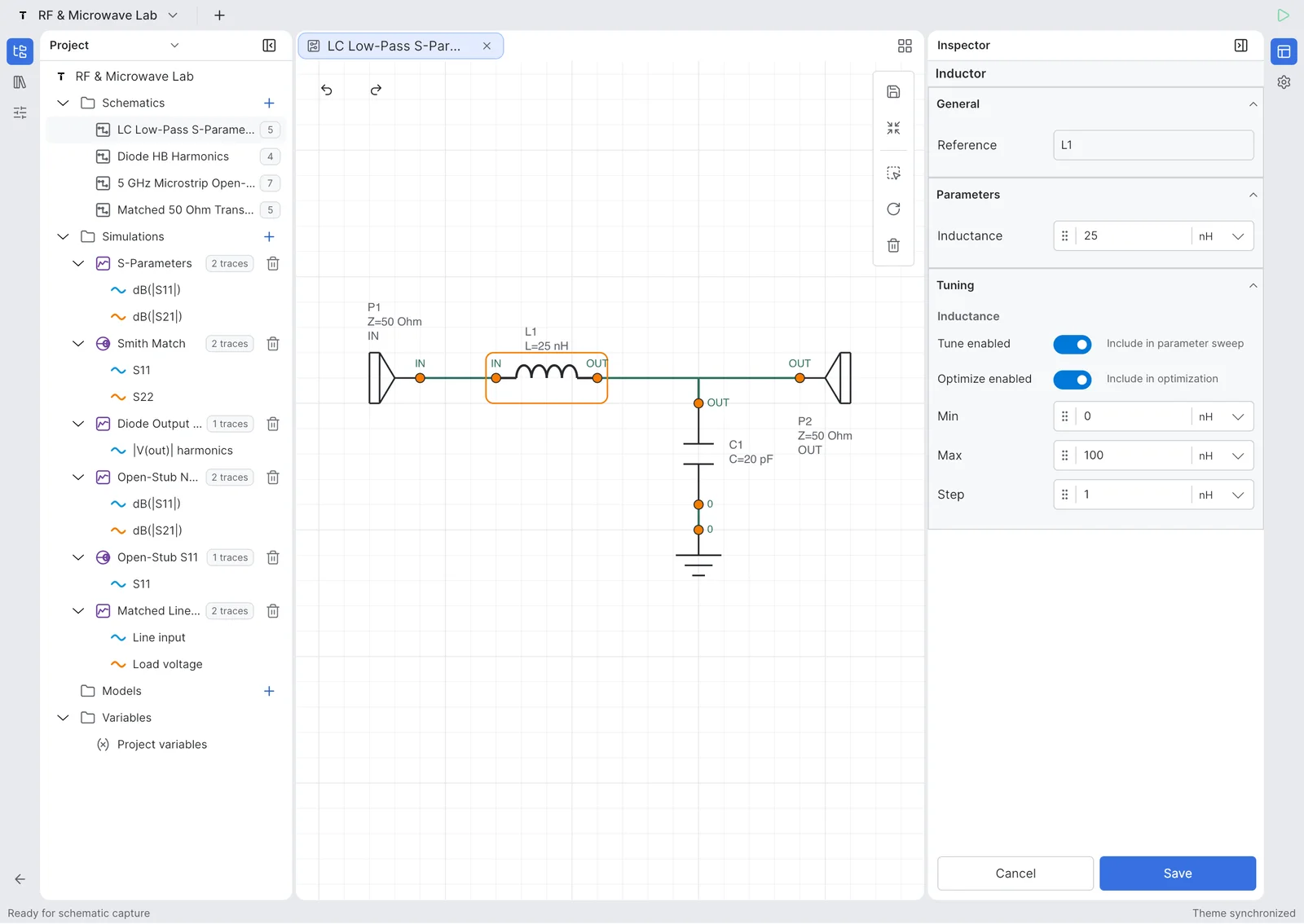
Tuning ranges expose capacitor and inductor values so the cutoff behavior can be optimized directly from the schematic.

500 MHz low-pass filter tuning sweep with multiple S-parameter traces showing cutoff movement and stopband behavior

500 MHz LPF tuning sweep

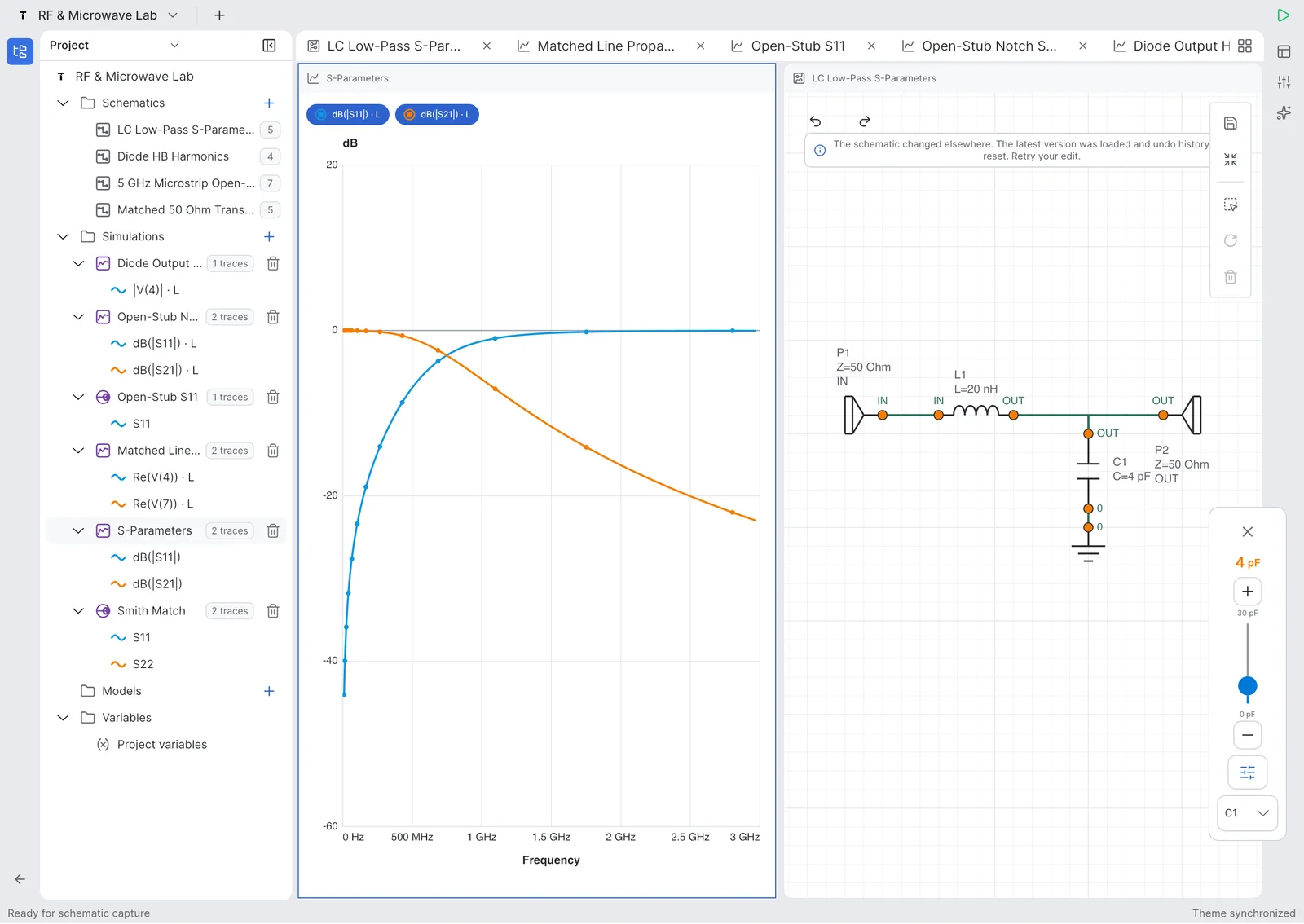
A tuning sweep compares multiple S-parameter traces around the cutoff and stopband regions.

Tersa EDA project workspace showing a 500 MHz low-pass filter schematic and simulation plot on iPad

500 MHz LPF project workspace

The project workspace keeps the LPF schematic, simulation plot, variables, and tunable parameters in one engineering flow.

Return loss and insertion loss plot for a 500 MHz low-pass filter from 0 Hz to 1 GHz in Tersa EDA

500 MHz LPF return loss and insertion loss

Return loss and insertion loss traces make it possible to inspect passband fit and out-of-band rejection.

Ferramentas RF

Feito para experimentos RF.

Tersa EDA inclui medições RF junto da simulação analógica diária: parâmetros S, return loss, insertion loss, trajetórias em carta de Smith, ganho, estabilidade e marcadores de frequência alvo.

S11 / S21 / S12 / S22
Return loss e insertion loss
Marcadores na carta de Smith
Ganho e estabilidade
Fluxo de matching e tuning
RF e carta de Smith
Editor esquemáticoMedições e gráficos

Analógico

Útil para circuitos analógicos do dia a dia.

Use Tersa EDA para filtros, divisores, amplificadores, circuitos com diodos, transientes RC, resposta em frequência e testes rápidos.

Resposta AC em frequênciaFormas de onda transientesMedições de tensãoAjuste de componentesCircuitos de exemplo

Capturas

Um workspace que acompanha o circuito.

Telas reais de projetos, edição esquemática, gráficos RF, carta de Smith e tuning.

Projetos

Projetos

Lista de esquemáticos

Lista de esquemáticos

Editor esquemático

Editor esquemático

Gráfico retangular

Gráfico retangular

Carta de Smith

Carta de Smith

Tuner de componentes

Tuner de componentes

Beta testing

Tersa EDA entrou em beta testing.

Convidamos engenheiros, estudantes e equipes RF/analógicas para testar builds iniciais e dizer o que devemos refinar primeiro.

Lançamento beta previsto: por volta de 5 de agosto de 2026.
Enviar email direto: hello@tersaeda.com

Conte o que você quer testar

Envie um pedido curto de beta e responderemos por hello@tersaeda.com.

FAQ

Tersa EDA é uma ferramenta de PCB?

Ainda não. Tersa EDA foca em captura esquemática, simulação, medições, gráficos e tuning analógico/RF.

Substitui ADS, AWR ou LTspice?

Não. É um workspace leve para experimentos rápidos, revisão mobile e tuning RF/analógico.

O que posso simular?

As primeiras versões focam circuitos analógicos, análises AC e transientes, parâmetros S, cartas de Smith e ajuste de componentes.

É apenas mobile?

Não. A interface foi projetada para mobile, tablet e desktop.

Qual workflow de simulador usa?

Tersa EDA usa um workflow SPICE-compatible para análise de circuitos.