

Tersa EDA
Tersa EDARF / analog

随时调试模拟与射频电路。

Tersa EDA 是面向移动端和桌面的应用,用于创建原理图、运行电路仿真、调谐元件并检查射频测量。

原理图AC / 瞬态S 参数Smith 圆图元件调谐
射频与 Smith 圆图
原理图编辑器
元件调谐器
运行 / Live

产品验证

为真实电路工作而设计。

创建原理图,选择分析,添加测量并调谐数值,全程无需离开设备。

原理图编辑器
原理图编辑器

原理图编辑器

使用端口、元件、网络标签和触控友好的编辑方式绘制模拟与射频电路。

测量
测量与曲线

测量与曲线

检查波形、标记、频率响应和派生测量。

RF
射频与 Smith 圆图

射频与 Smith 圆图

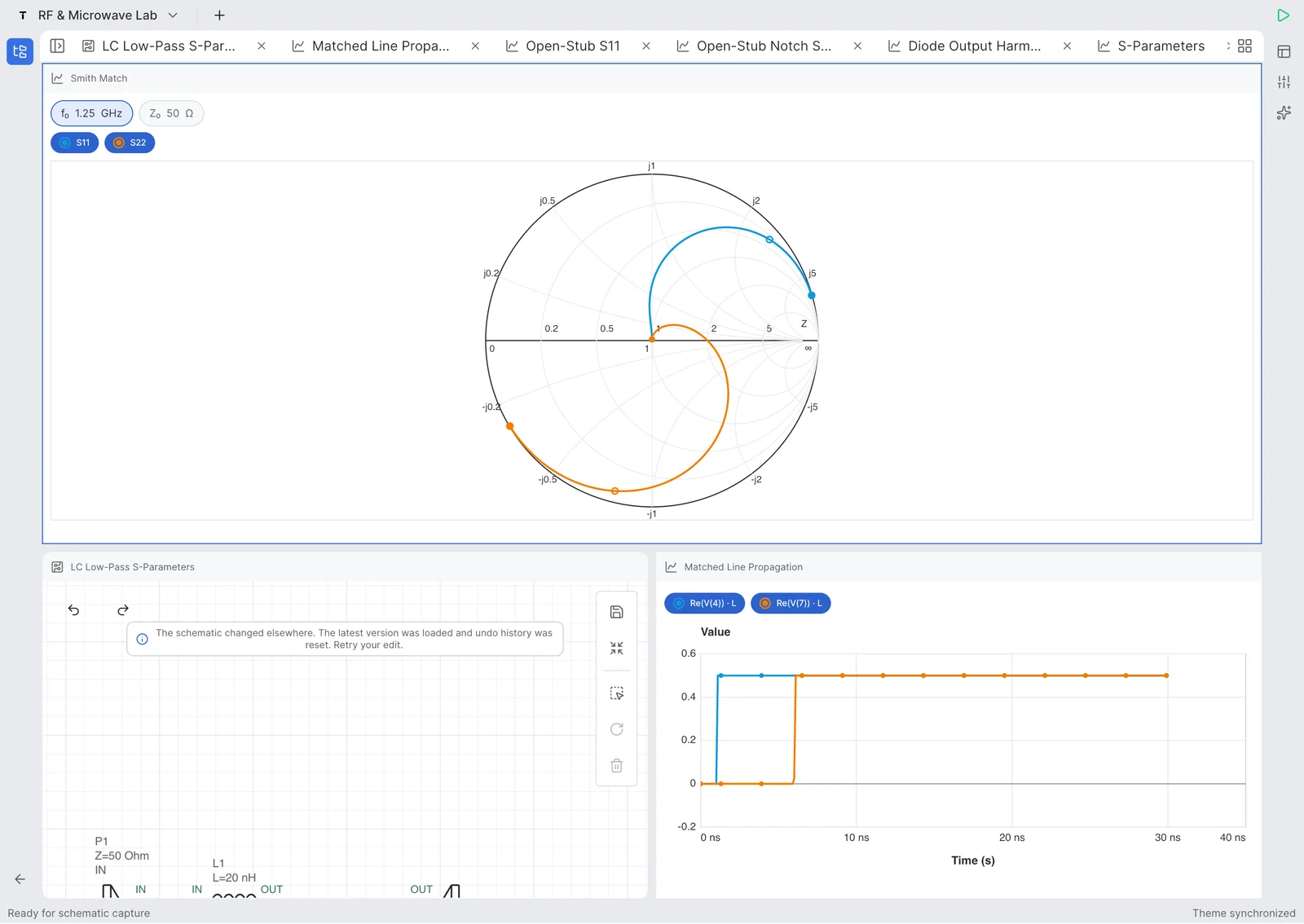
分析 S 参数、return loss、insertion loss、阻抗和 Smith 圆图轨迹。

Updated July 27, 2026

Tersa EDA answers

What is Tersa EDA?

Tersa EDA is an RF and analog circuit simulation workspace for engineers, students, and hardware teams who need a focused schematic-to-measurement flow. It combines schematic capture, SPICE-compatible analysis setup, plots, RF measurements, Smith chart inspection, and component tuning in one product surface. The goal is not to replace large desktop EDA suites. The product is designed for quick experiments, tablet review, mobile debugging, and focused circuit tuning when the important question is how the response changes after a component value, port, or measurement is adjusted.

What RF measurements does it support?

Tersa EDA presents RF results around practical measurements: S11, S21, S12, S22, return loss, insertion loss, gain, stability-oriented traces, frequency markers, and Smith chart trajectories. The workflow starts from the schematic, adds ports and analysis settings, then keeps the plot and tuner connected to the circuit. This makes it useful for filters, matching networks, resonators, small-signal experiments, and quick RF review where the designer needs to compare traces instead of exporting data between separate tools.

What does the 500 MHz LPF example show?

The 500 MHz low-pass filter example demonstrates a complete RF workflow on iPad. It shows a 50 ohm ladder filter with series inductors, shunt capacitors, input and output ports, S-parameter simulation to 1 GHz, insertion loss, return loss, and component tuning. The blue S21 trace shows passband behavior and roll-off, while the green S11 and S22 traces help inspect matching. The tuning sweep makes cutoff movement visible as capacitor and inductor values change around the target frequency.

功能

从原理图到测量。

触控友好的原理图编辑器

在手机、平板或桌面上使用元件、端口、标签和可复用页面创建电路。

仿真结果

运行 AC、瞬态和射频分析,并使用清晰曲线、标记和轨迹控制。

射频工具

检查 S 参数、return loss、insertion loss、Smith 圆图、增益和稳定性指标。

元件调谐器

调谐元件值,并立即看到电路响应如何变化。

工作流

从原理图到洞察。

创建原理图,选择分析,添加测量并调谐数值,全程无需离开设备。

01

绘制电路

放置元件、连接网络并定义端口。

02

选择分析

运行 AC、瞬态或射频仿真。

03

添加测量

绘制电压、S 参数、损耗和标记。

04

调谐数值

调整元件并比较响应。

Product demos

观看 iPhone 和 iPad 上的真实 RLC 工作流。

短视频展示 Tersa EDA 中的原理图创建、仿真、测量和实时元件调谐。

在 YouTube 打开
iPhone shorts

Real-Time RLC Circuit Tuning on iPhone

Tune an RLC circuit directly on iPhone and watch the response update while component values change.

在 YouTube 打开
iPhone shorts

Building and Simulating an RLC Circuit on iPhone

Create an RLC schematic on iPhone, run simulation, and inspect the first measurement workflow.

在 YouTube 打开
iPad walkthroughs

Tuning RLC Resonance in Real Time on iPad

Use the iPad workspace to tune resonance and compare circuit response changes on a larger engineering canvas.

在 YouTube 打开
iPad walkthroughs

Building an RLC Resonator on iPad | Tersa EDA

Build an RLC resonator from scratch on iPad and move from schematic capture into analysis setup.

在 YouTube 打开

RF example

500 MHz low-pass filter example on iPad.

A concrete LPF case study built in Tersa EDA: schematic capture, 50 ohm ports, S-parameter simulation, insertion loss, return loss, and component tuning around a 500 MHz target.

Target

500 MHz LPF

Ports

50 ohm IN / OUT

Analysis

S-parameters to 1 GHz

Workflow

Schematic, plot, tuner

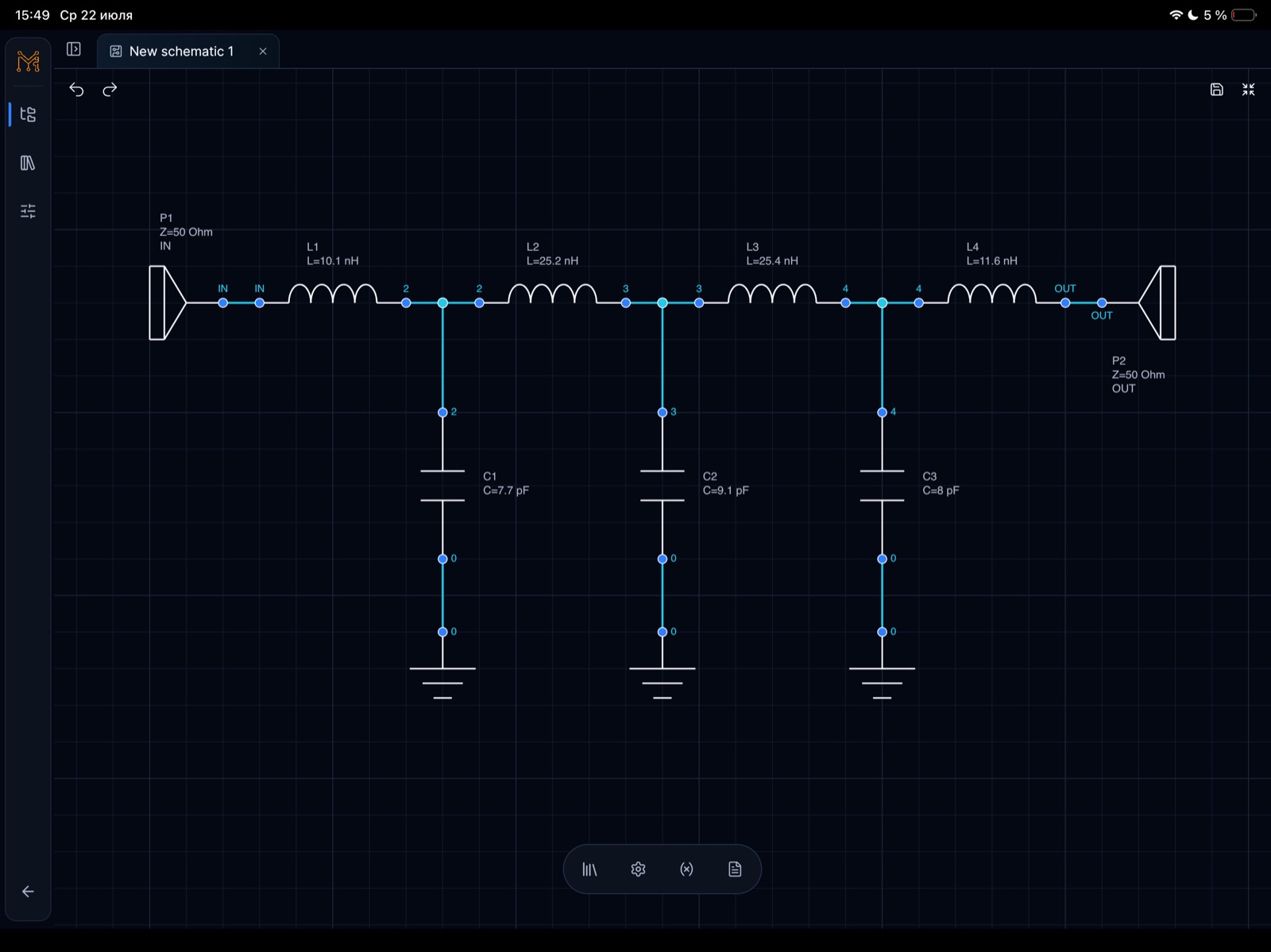
This example shows a lumped 500 MHz low-pass filter workflow, not a generic screenshot gallery. The circuit uses a ladder topology with 50 ohm input and output ports, series inductors, shunt capacitors, and RF measurements plotted from DC to 1 GHz.

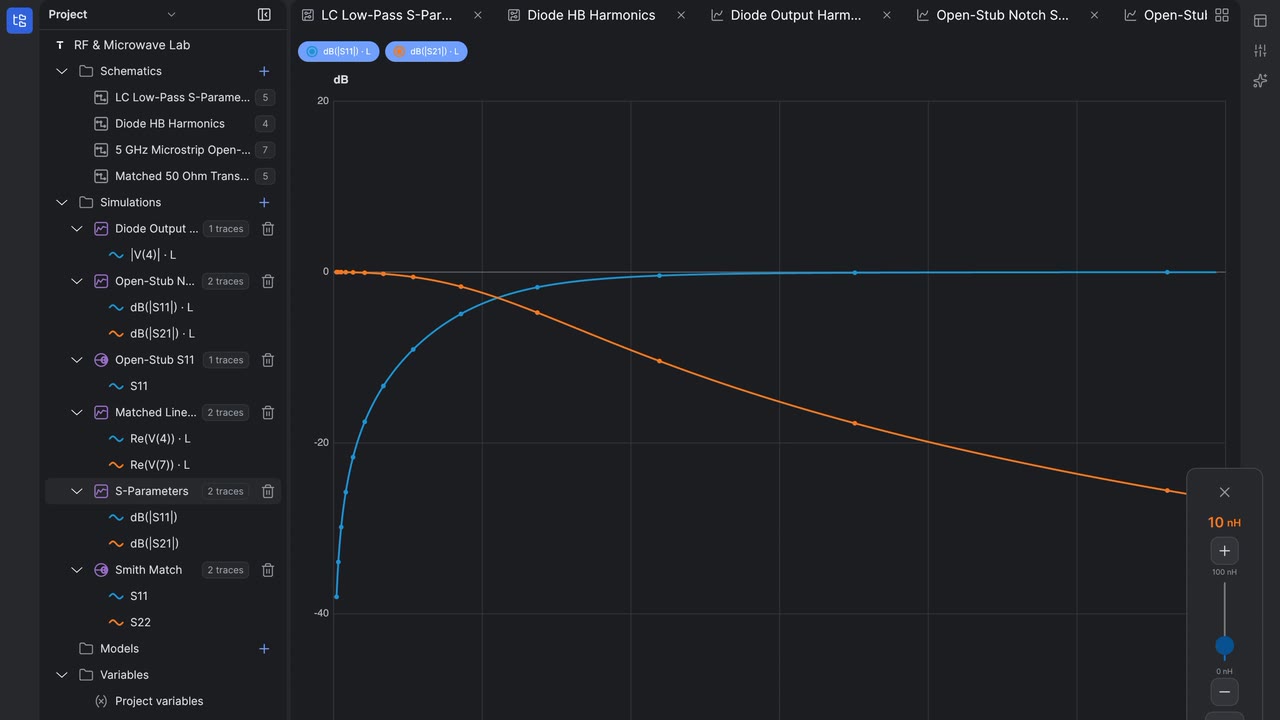
The blue S21 trace shows the passband and roll-off, while the green S11/S22 traces help inspect matching and return loss. Tuning sweeps make cutoff movement visible as component values change.

500 MHz low-pass filter schematic with 50 ohm input and output ports, four inductors, and three shunt capacitors in Tersa EDA on iPad
500 MHz low-pass filter schematic on iPad. Schematic capture for a 50 ohm 500 MHz low-pass filter with L1-L4 series inductors and C1-C3 shunt capacitors.
S-parameter plot for a 500 MHz low-pass filter showing S21 passband and roll-off toward 1 GHz in Tersa EDA

500 MHz LPF S-parameter response

S-parameter response with S21 staying flat through the passband before the transition region toward 1 GHz.

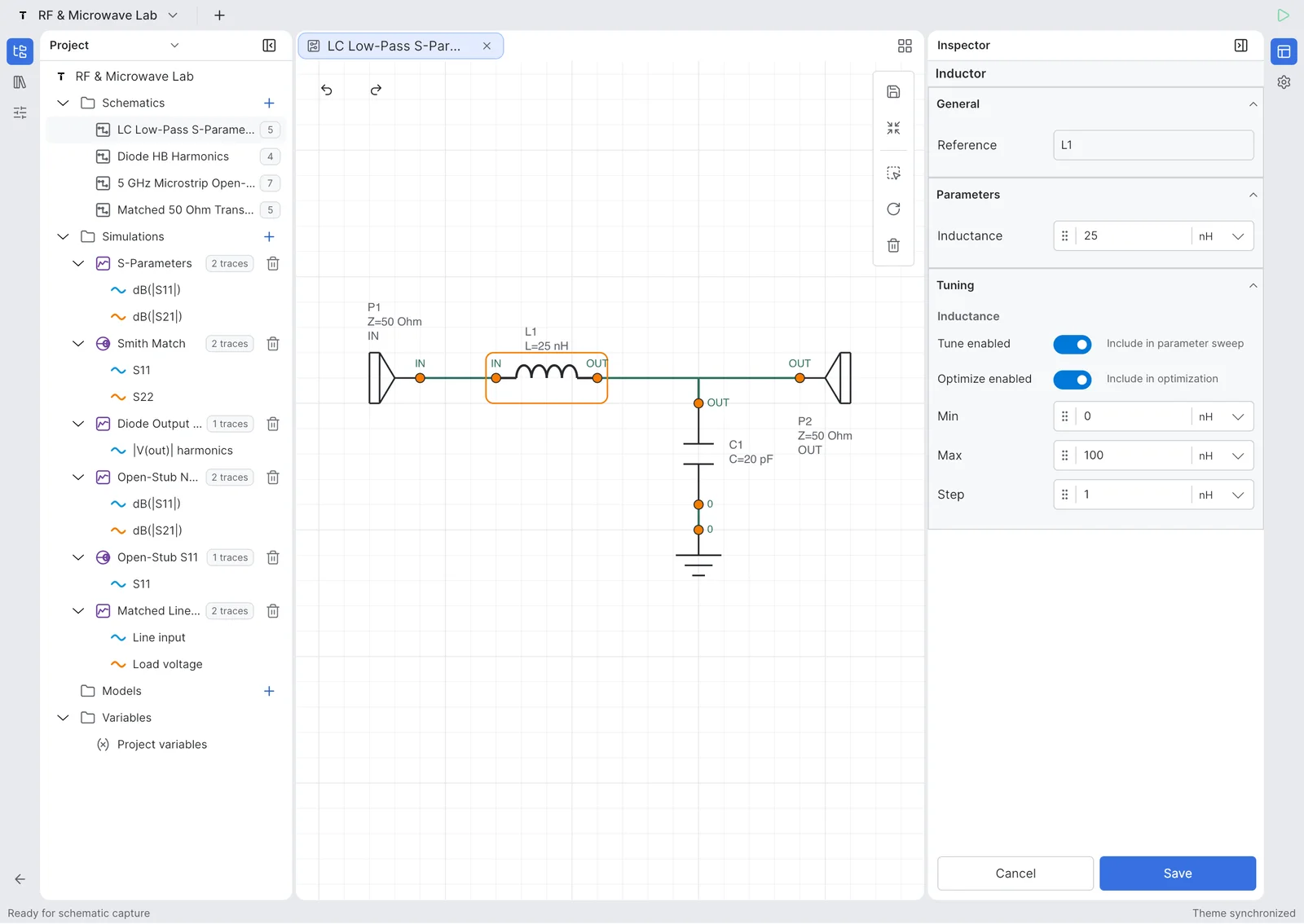
Tunable parameter panel for a 500 MHz low-pass filter showing capacitor and inductor optimization ranges on iPad

500 MHz LPF tunable component parameters

Tuning ranges expose capacitor and inductor values so the cutoff behavior can be optimized directly from the schematic.

500 MHz low-pass filter tuning sweep with multiple S-parameter traces showing cutoff movement and stopband behavior

500 MHz LPF tuning sweep

A tuning sweep compares multiple S-parameter traces around the cutoff and stopband regions.

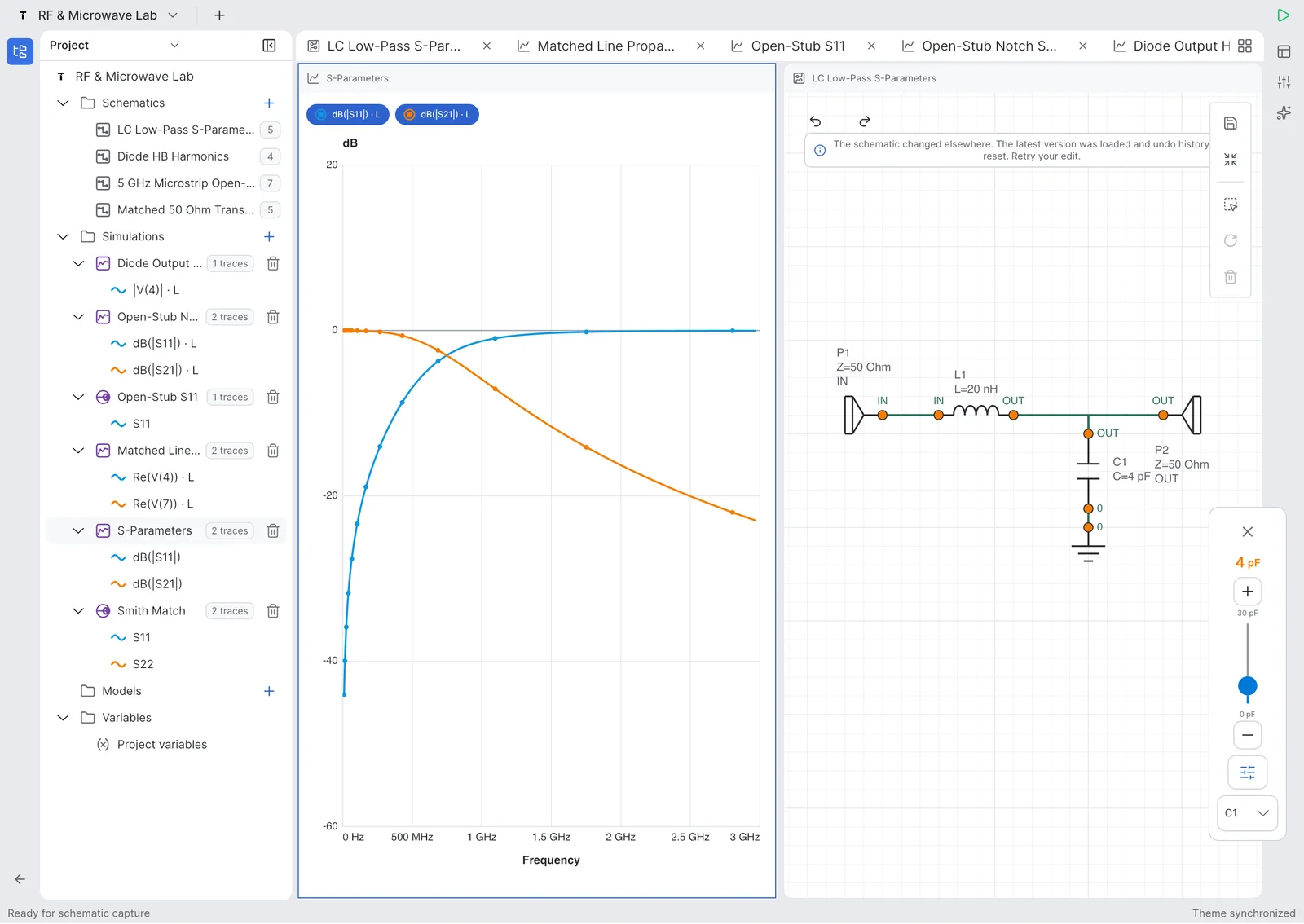
Tersa EDA project workspace showing a 500 MHz low-pass filter schematic and simulation plot on iPad

500 MHz LPF project workspace

The project workspace keeps the LPF schematic, simulation plot, variables, and tunable parameters in one engineering flow.

Return loss and insertion loss plot for a 500 MHz low-pass filter from 0 Hz to 1 GHz in Tersa EDA

500 MHz LPF return loss and insertion loss

Return loss and insertion loss traces make it possible to inspect passband fit and out-of-band rejection.

射频工具

为射频实验打造。

Tersa EDA 在日常模拟仿真旁提供射频测量:S 参数、return loss、insertion loss、Smith 圆图轨迹、增益、稳定性因子和目标频率标记。

S11 / S21 / S12 / S22
Return loss 与 insertion loss
Smith 圆图标记
增益和稳定性指标
匹配与调谐工作流
射频与 Smith 圆图
原理图编辑器测量与曲线

模拟

也适合日常模拟电路。

可用于滤波器、分压器、放大器、二极管电路、RC 瞬态、频率响应检查和快速 what-if 实验。

AC 频率响应瞬态波形电压测量元件调谐示例电路

截图

跟随电路前进的工作区。

项目、原理图编辑、射频曲线、Smith 圆图和调谐的真实应用截图。

项目

项目

原理图列表

原理图列表

原理图编辑器

原理图编辑器

矩形图

矩形图

Smith 圆图

Smith 圆图

元件调谐

元件调谐

Beta 测试

Tersa EDA 已进入 beta 测试。

我们邀请工程师、学生和 RF/模拟团队试用早期版本,并告诉我们应该优先打磨什么。

Beta 发布目标:约 2026 年 8 月 5 日。
直接发邮件: hello@tersaeda.com

告诉我们你想测试什么

发送一条简短的 beta 申请,我们会通过 hello@tersaeda.com 回复。

FAQ

Tersa EDA 是 PCB 设计工具吗?

暂时不是。Tersa EDA 专注于原理图捕获、电路仿真、测量、曲线和模拟/RF 调谐。

它能替代 ADS、AWR 或 LTspice 吗?

不能。它是用于快速实验、移动查看和 RF/模拟调谐的轻量工作区。

可以仿真什么?

首批版本聚焦模拟电路、AC 和瞬态分析、S 参数、Smith 圆图和元件调谐。

只能在移动端使用吗?

不是。界面面向手机、平板和桌面。

使用什么仿真工作流?

Tersa EDA 使用 SPICE-compatible 工作流进行电路分析。