

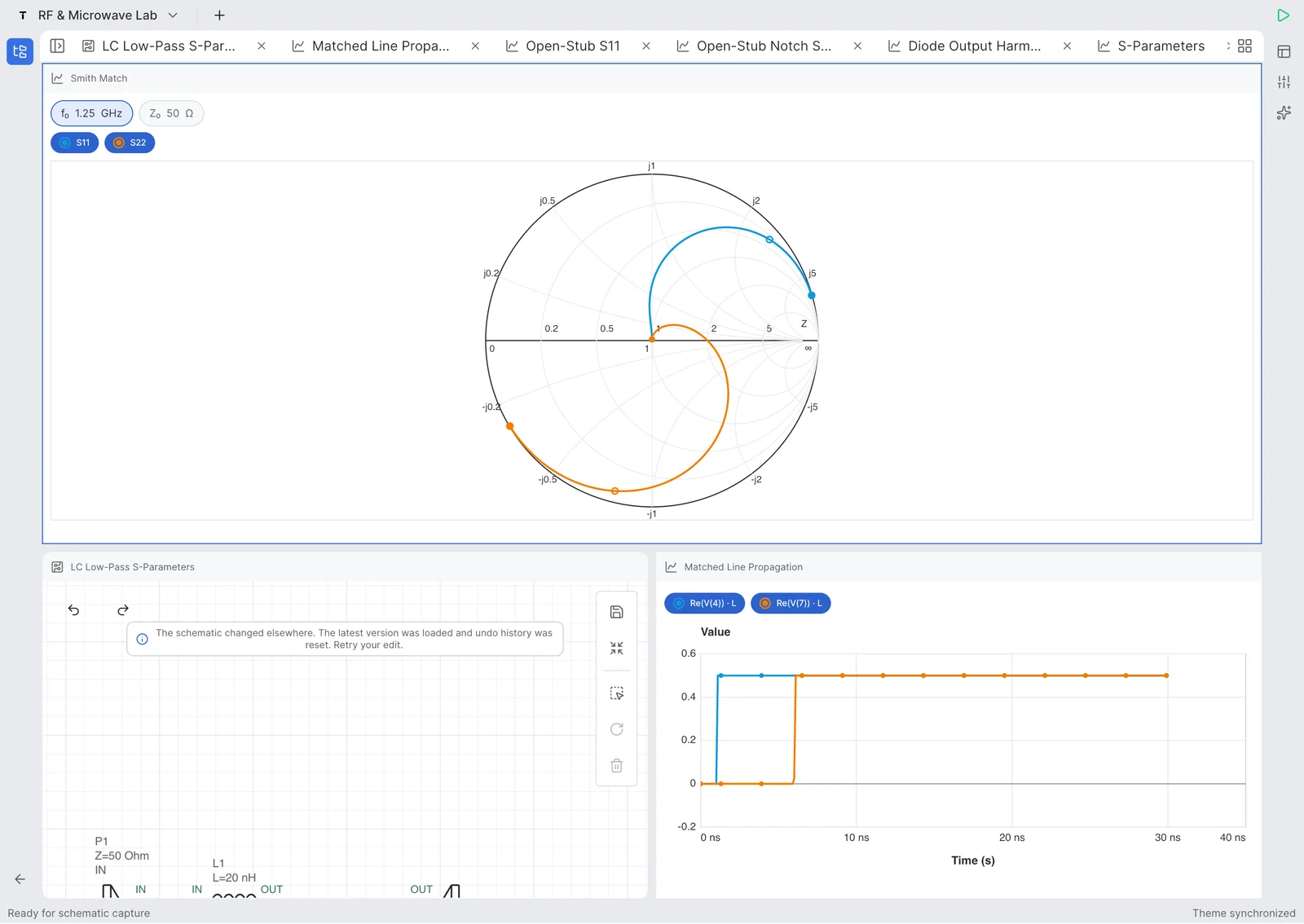
回路図エディタ
ポート、部品、ネットラベルを使って、タッチ操作に適したアナログ/RF回路を作成できます。
Tersa EDA は、回路図作成、シミュレーション、部品チューニング、RF測定確認のためのモバイル/デスクトップアプリです。


製品の実証
回路図を作り、解析を選び、測定を追加し、値を調整できます。

ポート、部品、ネットラベルを使って、タッチ操作に適したアナログ/RF回路を作成できます。

トレース、マーカー、周波数応答、派生測定を確認できます。

Sパラメータ、リターンロス、挿入損失、インピーダンス、Smithチャート軌跡を解析できます。
Updated July 27, 2026
Tersa EDA is an RF and analog circuit simulation workspace for engineers, students, and hardware teams who need a focused schematic-to-measurement flow. It combines schematic capture, SPICE-compatible analysis setup, plots, RF measurements, Smith chart inspection, and component tuning in one product surface. It is designed for quick experiments, tablet review, mobile debugging, and focused circuit tuning when the important question is how the response changes after a component value, port, or measurement is adjusted.
Tersa EDA presents RF results around practical measurements: S11, S21, S12, S22, return loss, insertion loss, gain, stability-oriented traces, frequency markers, and Smith chart trajectories. The workflow starts from the schematic, adds ports and analysis settings, then keeps the plot and tuner connected to the circuit. This makes it useful for filters, matching networks, resonators, small-signal experiments, and quick RF review.
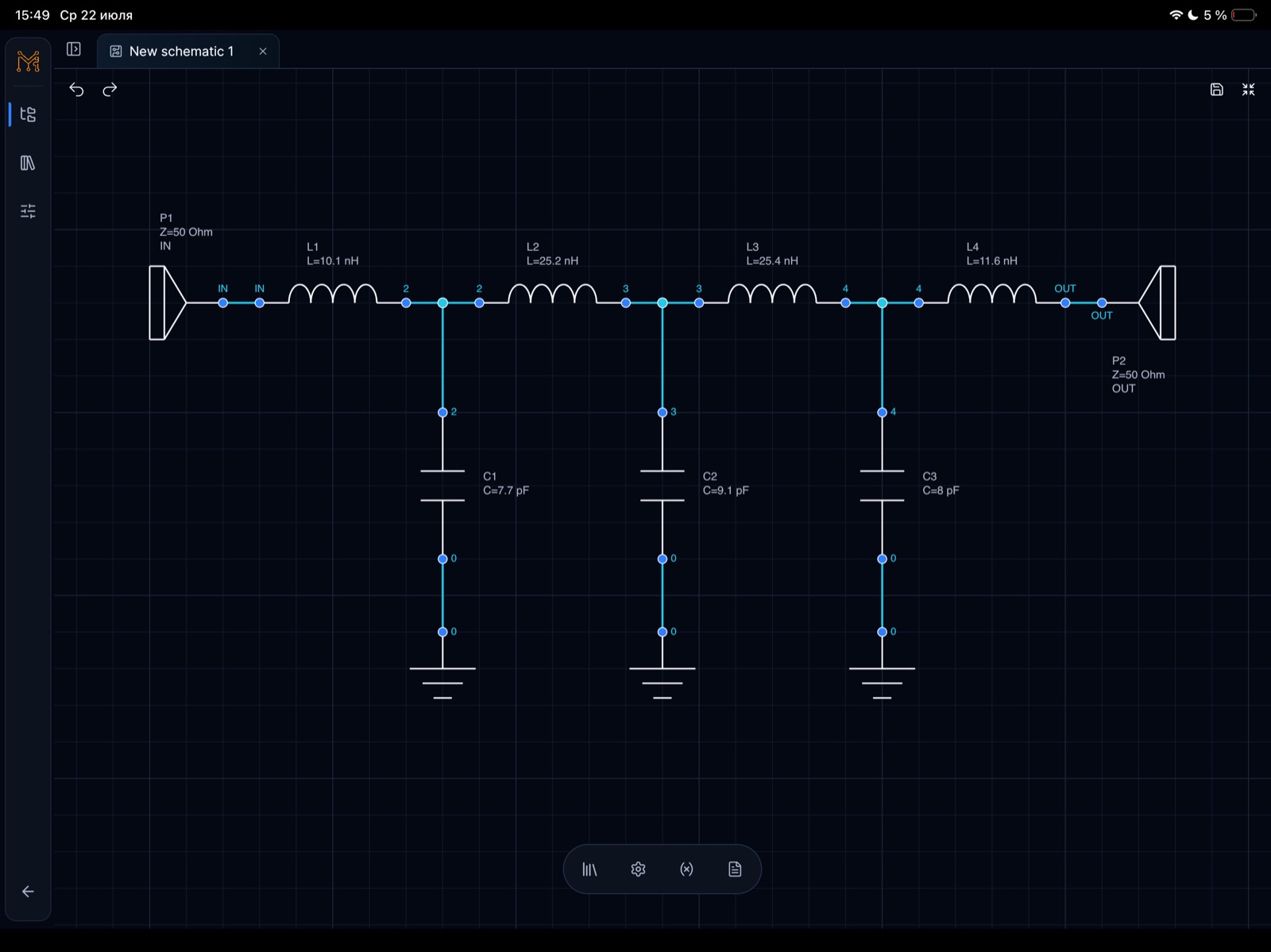
The 500 MHz low-pass filter example demonstrates a complete RF workflow on iPad. It shows a 50 ohm ladder filter with series inductors, shunt capacitors, input and output ports, S-parameter simulation to 1 GHz, insertion loss, return loss, and component tuning. The tuning sweep makes cutoff movement visible as capacitor and inductor values change around the target frequency.
機能
モバイル、タブレット、デスクトップで部品、ポート、ラベル、再利用シートを扱えます。
AC、過渡、RF解析を、見やすいプロット、マーカー、トレース操作で実行できます。
Sパラメータ、リターンロス、挿入損失、Smithチャート、利得、安定度指標を確認できます。
部品値を調整し、回路応答の変化をすぐに確認できます。
ワークフロー
回路図を作り、解析を選び、測定を追加し、値を調整できます。
部品を配置し、ネットを接続し、ポートを定義します。
AC、過渡、RFシミュレーションを実行します。
電圧、Sパラメータ、損失、マーカーをプロットします。
部品を調整し、応答を比較します。
Product demos
短い動画で、回路図作成、シミュレーション、測定、ライブ部品チューニングを確認できます。
Tune an RLC circuit directly on iPhone and watch the response update while component values change.
YouTubeで開くCreate an RLC schematic on iPhone, run simulation, and inspect the first measurement workflow.
YouTubeで開くUse the iPad workspace to tune resonance and compare circuit response changes on a larger engineering canvas.
YouTubeで開くBuild an RLC resonator from scratch on iPad and move from schematic capture into analysis setup.
YouTubeで開くRF example
Tersa EDAで作成した具体的なLPF case study: 回路図、50 ohmポート、S-parameter simulation、insertion loss、return loss、500 MHz付近の部品チューニング。
Target
500 MHz LPF
Ports
50 ohm IN / OUT
Analysis
S-parameters to 1 GHz
Workflow
Schematic, plot, tuner
これは単なるスクリーンショット集ではなく、500 MHz lumped low-pass filterのworkflowです。50 ohmの入力/出力ポート、series inductors、shunt capacitors、DCから1 GHzまでのRF測定を扱います。
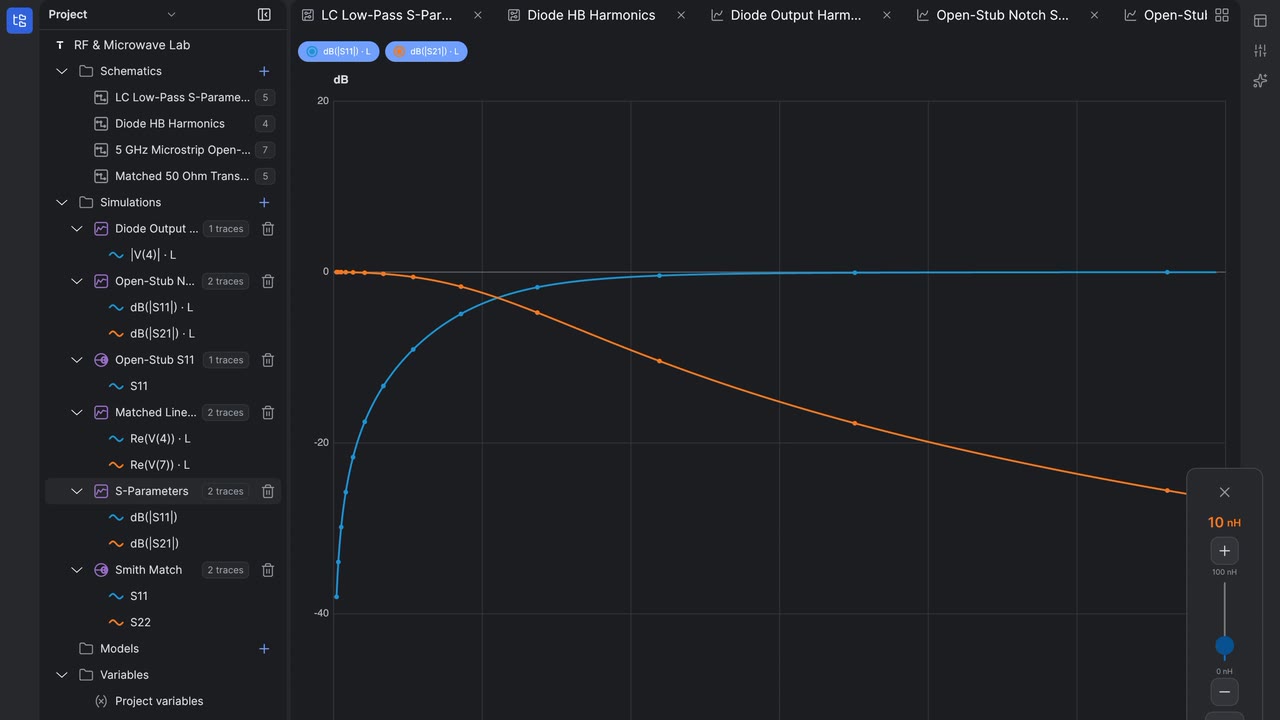
青いS21トレースでpassbandとroll-offを確認し、緑のS11/S22トレースでmatchingとreturn lossを確認できます。Tuning sweepにより、部品値変更によるcutoff移動が見えます。


S-parameter response with S21 staying flat through the passband before the transition region toward 1 GHz.

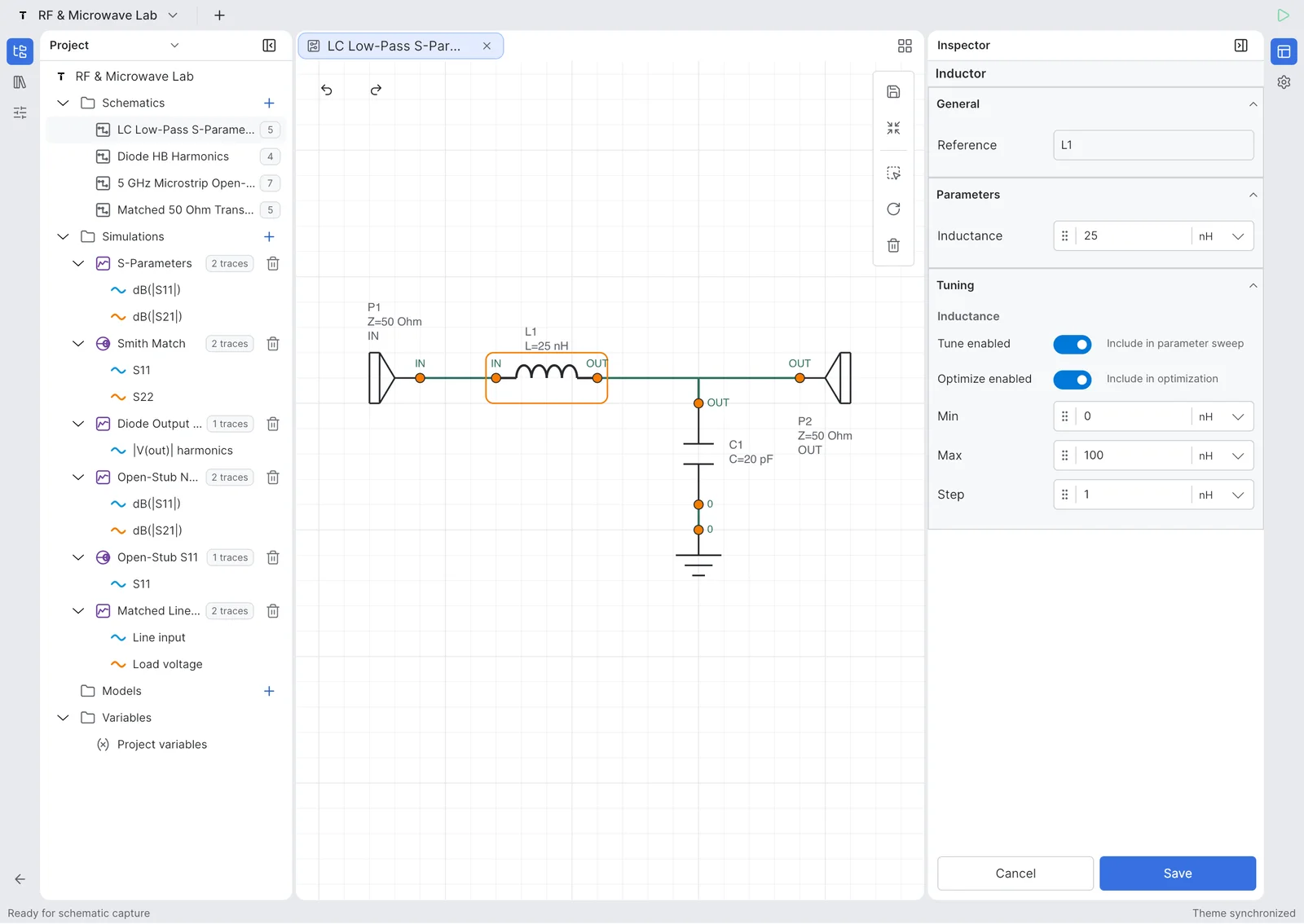
Tuning ranges expose capacitor and inductor values so the cutoff behavior can be optimized directly from the schematic.

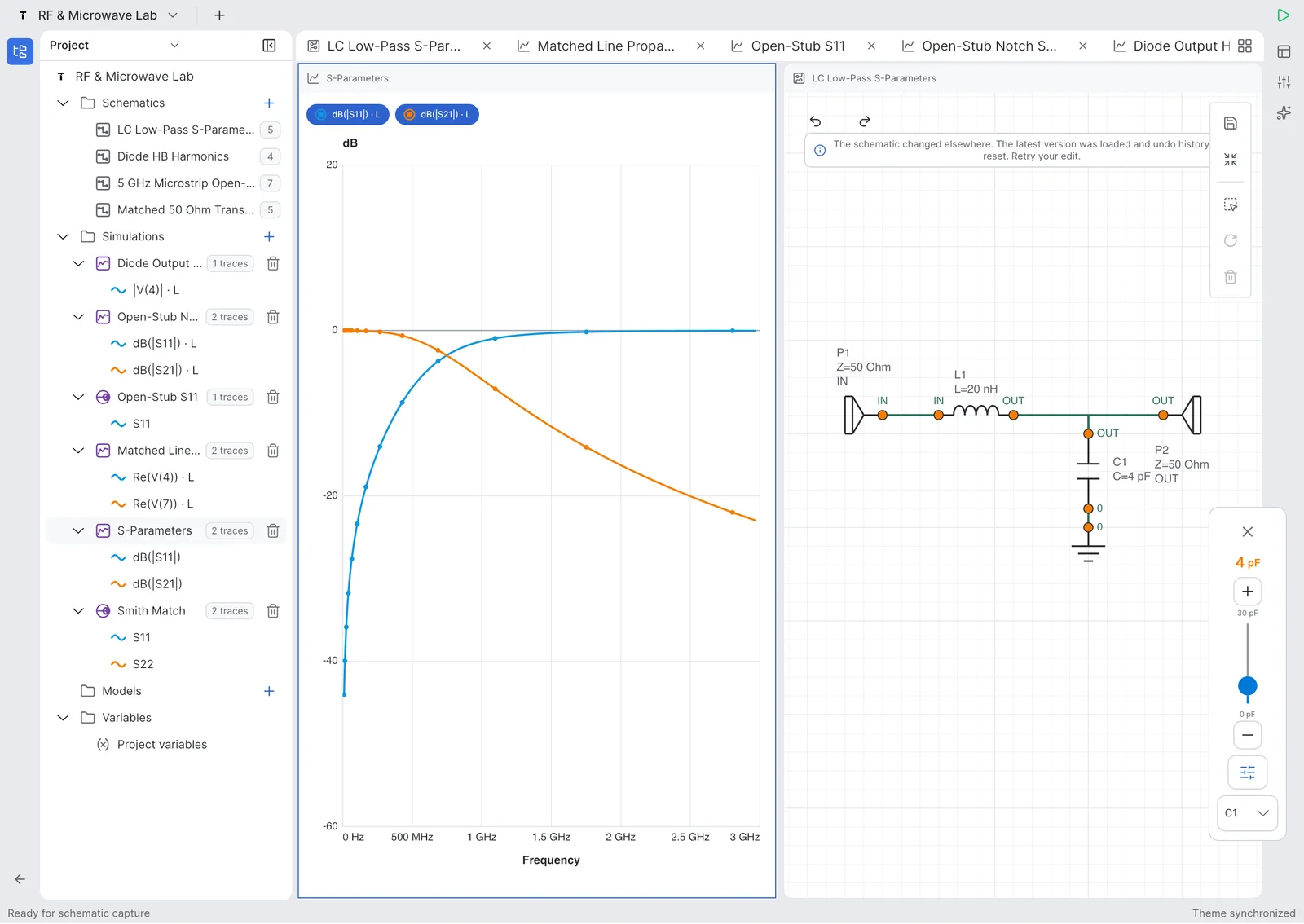
A tuning sweep compares multiple S-parameter traces around the cutoff and stopband regions.

The project workspace keeps the LPF schematic, simulation plot, variables, and tunable parameters in one engineering flow.

Return loss and insertion loss traces make it possible to inspect passband fit and out-of-band rejection.
RFツール
Tersa EDA は、日常的なアナログ解析に加えて、Sパラメータ、リターンロス、挿入損失、Smithチャート軌跡、利得、安定度、ターゲット周波数マーカーを扱えます。


アナログ
フィルタ、分圧回路、アンプ、ダイオード回路、RC過渡応答、周波数応答確認、簡単なwhat-if実験に使えます。
スクリーンショット
プロジェクト、回路図編集、RFプロット、Smithチャート、チューニングの実画面。


Beta testing
エンジニア、学生、RF/アナログチームに初期ビルドを試してもらい、最初に磨くべき点を聞いています。
まだ違います。回路図作成、シミュレーション、測定、プロット、アナログ/RFチューニングにフォーカスしています。
いいえ。素早い実験、モバイル確認、RF/アナログ調整のための軽量ワークスペースです。
初期版はアナログ回路、AC/過渡解析、Sパラメータ、Smithチャート、部品チューニングにフォーカスします。
いいえ。モバイル、タブレット、デスクトップ向けに設計されています。
Tersa EDA は SPICE-compatible workflow を使用します。